Showing posts with label Salesforce. Show all posts

Tuesday, 5 September 2017

How To Stop Deletion Of Parent Record If Child Record Is Exist in salesforce Using Configuration

Arpit Sharma
In Salesforce if we want to create one to many relationship(one parent record have many child) then one way is to we can use lookup relationship feature of salesforce.

In case of lookup relationship If we want to stop deletion of parent record then we don't need to worry about it, We can configure it from look relationship configuration page.

We can configure it during lookup field creation and edit.

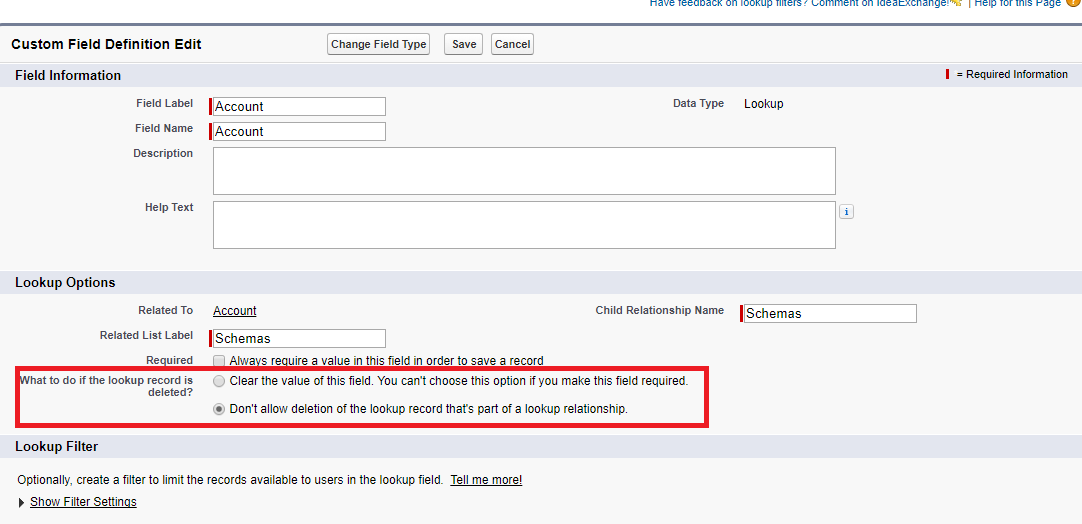
Salesforce provide us two option during lookup field configuration, we need to select second option to stop deletion of parent.

1. During parent record deletion set child lookup field value to blank.
2. During parent deletion stop deletion of parent.

But we can't select first option if we set lookup field to required on child object
because in that case we can't set field to blank because field is required on child record. You can see option in screenshot.


If we try to delete parent record then salesforce gives following error. 

Your attempt to delete Parent Record could not be completed because it is associated with the following Child Records. If the following table is empty, it is because you do not have access to the records restricting the delete.

So for deletion of parent record we need to delete all child record first.


Wednesday, 16 August 2017

Identify Current User Access To Record Using UserRecordAccess Object

Arpit Sharma
Salesforce provide UserRecordAccess object to identify access of user on set of records. We can query on this object based on user ID.

Key Points of UserRecordAccess
    1. This object is read only.
    2. It is available in API Version 24.0 and later.

Fields of UserRecordAccess 
    • RecordId - Id of record in which we need to check access, It is available in SELECT clause and WHERE clause. 
    • UserId - It is available in WHERE clause.
    • User Record Access Id - It is available in WHERE clause.
    • Maximum Access Level - It is used to identify maximum access of record having user(Picklist type). Value available in picklist.
        • None
        • Read
        • Edit
        • Delete
        • Transfer
        • All
    • HasTransferAccess(Boolean Type)
    • HasEditAccess(Boolean Type)
    • HasDeleteAccess(Boolean Type)
    • HasAllAccess(Boolean Type)

Sample Query
SELECT RecordId, HasEditAccess,HasReadAccess, HasTransferAccess, MaxAccessLevel,HasDeleteAccess
     ,HasAllAccess FROM UserRecordAccess
     WHERE UserId = UserInfo.getUserId()
     AND RecordId = :recordId     

References
https://developer.salesforce.com/docs/atlas.en-us.api.meta/api/sforce_api_objects_userrecordaccess.htm
https://help.salesforce.com/articleView?id=000181207&type=1


Friday, 11 August 2017

Reports In Salesforce

Arpit Sharma
Why Report


Report is usually used to represent data in presentable form, Creating a report manually required lot of effort which included many question in mind i.e which type of data you required, what is the best way to represent data in report.

If you need data based on some criteria then there may be chances some unwanted data visible in report or some important data is not visible because of some human error. Report generated become more complicated when you work on large data. This is point where you need some automatic process to generate report for you business.

We will discuss here, about reports in Salesforce

Reports in Salesforce

Various tools are available in market to generate reports but if you are working in Salesforce then either you need to write custom code for represent that data or Salesforce itself provide most advance way to generate report by using just some point and click that does not require knowledge of code and reduce efforts and time

What Salesforce provide 
  1. We can set schedule time of report generation.
  2. Salesforce display data to user in report according to security model means user can't see data if user does not have permission of that data.
  3. In salesforce we can generate four type of reports
    • Tabular Reports
    • Summary Reports
    • Matrix Reports
    • Joined Reports 
Guys all above is basic idea about what is report, how it is useful for us and what Salesforce provide to us.

We will discuss above report types in details in upcoming tutorials

Feel free to comment if you have any question and suggestions in this tutorial.


Friday, 14 April 2017

apex:slds - Include lightning design system by using apex tag

Arpit Sharma


To use lightning design system we don't need to upload library  to static resource and reference them in visual force page. We can include them by using apex tag i.e <apex:slds/>. here is example of include of slds in visual force page.


 1
 2
 3
 4
 5
 6
 7
 8
 9
10
11
12
13
14
15
16
17
18
19
<apex:page standardStylesheets="false" sidebar="false" showHeader="false">
  <apex:slds/>
  <apex:form>
      <!-- Without lightning designing CSS-->    
      <div >
          <label for="inputLabel">Input Label</label>
          <div>
             <input type="text" id="inputLabel"  placeholder="Without lightning designing CSS"/>  
          </div>
      </div>
      <!-- With lightning designing CSS-->
      <div class="slds-form-element">
          <label class="slds-form-element__label" for="inputLabel">Input Label</label>
          <div class="slds-form-element__control">
             <input type="text" id="inputLabel" class="slds-input" placeholder="With lightning designing CSS"/>  
          </div>
      </div>    
  </apex:form>
</apex:page>


Thursday, 13 April 2017

How to get object name from ID of record

Arpit Sharma


In Salesforce some time we have requirement to retrieve object name from record ID. So We can done this by two approach.

First approach
  • Get SObject type from record ID by using getSObjectType() method.
  • Convert Sobject type into string value.


1
2
3
4
Contact contactRecord = new Contact(FirstName = 'Test', LastName = 'Contact');
insert contactRecord;
// contactRecord.Id.getSObjectType() return Sobject Type of record then we convert them into String
String objectName = String.valueOf(contactRecord.Id.getSObjectType());

Second approach

  • Get Sobject type from record id by using getSObjectType() method.
  • Describe Sobject type by using getDescribe() method.
  • Then get name of object from object describe by using getName() method .


1
2
3
4
5
6
7
8
Contact contactRecord = new Contact(FirstName = 'Test', LastName = 'Contact');
insert contactRecord;
/*
   - first we get Sobject type by using statement contactRecord.Id.getSObjectType()
   - we describe Sobject type by using getDescribe() method.
   - then from object describe by using getName() we can get name of that object 
*/
String objectName = contactRecord.Id.getSObjectType().getDescribe().getName();

Friday, 24 March 2017

How upload large file in salesforce

Arpit Sharma


In Salesforce when we upload file using remote action then we are not able upload file more then 4.3 MB because above 4,3 MB we getting input too long error.so I found one solution in which we are able to upload file upto 25 MB In this approach we are using sforce api on visual force page to upload file on salesforce.below is code of uploading file upto 25 MB.

  1. <apex:page>
  2. <script type="text/javascript">
  3. var __sfdcSessionId = '{!GETSESSIONID()}';
  4. </script>
  5. <script src="/soap/ajax/34.0/connection.js" type="text/javascript"></script>
  6. <script>
  7. function uploadAttachmentFromVisualForcePage() {
  8. var reader = new FileReader();
  9. var attachFile = document.getElementById('idOfUploadInputFileElement').files[0];
  10. if (attachFile == undefined) {
  11. alert('Please select a file');
  12. return;
  13. }
  14. if (attachFile.size > 26214400) { //Where 26214400 is byte equivalent of 25MB
  15. alert('Attachment size not supported');
  16. }
  17. reader.onload = function(e) {
  18. var attachment = new sforce.SObject('Attachment');
  19. attachment.Name = attachFile.name;
  20. attachment.IsPrivate = false;
  21. attachment.ContentType = attachFile.type;
  22. attachment.Body = (new sforce.Base64Binary(e.target.result)).toString();;
  23. attachment.Description = attachFile.name;
  24. attachment.ParentId = 'recordID'; //Where recordID is the ID of record to which you want to add your attachment
  25. var result = sforce.connection.create([attachment]);
  26. if (result[0].getBoolean("success")) {
  27. alert('file uploaded successfully');
  28. } else {
  29. alert('something went wrong.');
  30. }
  31. };
  32. reader.readAsBinaryString(attachFile);
  33. }
  34. </script>
  35. <input type="file" id="idOfUploadInputFileElement" /><input type="button" value="Upload" onClick="uploadAttachmentFromVisualForcePage();" />
  36. </apex:page>

How to get list view id in apex class

Arpit Sharma
salesforce
Get list view id  using apex class in salesforce first we need to describe organization sobject by using below function

Step 1 - 

Schema.getGlobalDescribe() - This map contains organization object. map populate during run time based on permission. Key of map is sobject name and value is Sobject tokens.token is serializeable reference to sobject. 

Map<String, Schema.SObjectType> globalDescribe = Schema.getGlobalDescribe();

Step 2-

Suppose if we want to describe Standard object account then we need to retrieve account token from map,If your org have namespace then you need to add namespace to custom object name because map contains object name with namespace as key.

Schema.SObjectType accInfo =  Schema.getGlobalDescribe().get( 'Account' );

Step 3-

Now we will describe Account object using getDescribe(), Return result is not serializeble, result contains all describe property of object or fields 

DescribeSObjectResult accDesc = accInfo.getDescribe();

Step 4-

Now we need to reterive object List view id  from descrbie sobject result.

String listViewId = accDesc.getKeyPrefix();